Download Instagram Reels and videos online in HD MP4 or MP3 format. Paste a public Instagram URL, preview the content, and save it instantly — no login required.
Supports public instagram.com/reel/... and public single video instagram.com/p/... URLs.
Processing your Instagram link...
Instagram author
Instagram video preview
In queue
0%
Your file will be ready shortly. The download will start automatically.
What is SaveReels?
SaveReels is a free Instagram reels downloader that lets you download Instagram videos, reels, and audio online. It works directly in your browser with no login required. Paste a supported Instagram URL, preview it, and download it in HD MP4 or convert it to MP3 audio.
How to Download Instagram Reels Online
1
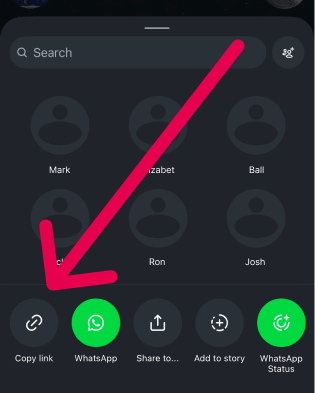
Copy the Instagram URL
Open Instagram and copy the public reel URL or single-video post URL you want to download.
2
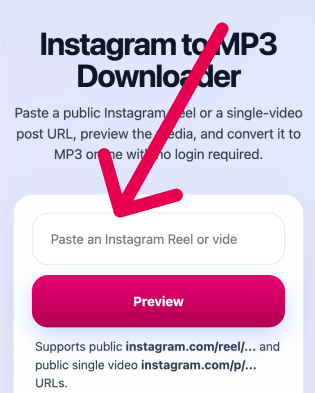
Paste the link
Paste the Instagram URL into the downloader and preview the video before downloading.
3
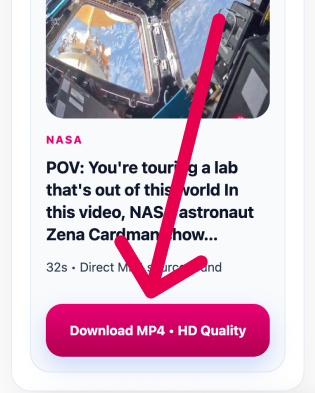
Download the MP4
Download the Instagram video in HD MP4 or convert it to MP3 audio in one click.
Why Use SaveReels?
No Login Required
Download Instagram reels without login or an account. Simply paste the link and start downloading.
HD MP4 Quality
Save Instagram videos in the best available HD MP4 quality from the original source.
Fast & Easy Downloader
Preview and download Instagram videos in seconds — right in your browser.
Works on All Devices
Use this Instagram downloader on iPhone, Android, Windows, and macOS — right in your browser.
Key Features
Works on Any Device
Use the downloader seamlessly on mobile, tablet, or desktop — no installation needed.
No Subscriptions Required
Download Instagram content completely free, without hidden fees or premium plans.
Your Privacy Matters
We don’t store your data or track your activity — everything stays private and secure.
HD & Original Quality
Get videos and photos in the highest available quality, exactly as uploaded.
No Signup Needed
Start downloading instantly — no account, no login, no hassle.
Who Is It For?
Creators
Download your own public Instagram reels and video posts for republishing, review, backups, or content archiving.
Social Teams
Save approved public Instagram video references for campaign tracking, reporting, and content planning.
Editors
Download Instagram video references for editing queues, shot studies, and short-form production research.
Researchers
Archive public Instagram reel and video examples for audits, analysis, and media review.
Available Formats
MP4 Video
Download public Instagram reels and videos in MP4 format for broad device compatibility.
MP3 Audio
Extract audio from a supported Instagram reel or video post and save it as MP3 online.
FAQ
SaveReels supports public /reel/ URLs and public single-video /p/ post URLs. Image posts, carousels, stories, and private content are not supported in this version.
No. SaveReels works only with publicly accessible Instagram content.
Yes. Use the MP3 page to extract audio from the same supported public Instagram video URLs.
No. The entire Instagram download flow works directly in your browser, with no software or extension required.
It depends on your local laws and how you use the downloaded file. In general, only download content you own, have permission to use, or are otherwise allowed to copy for personal use.
SaveReels provides the best available public HD MP4 quality it can derive from the source post. Final quality depends on what Instagram makes available for that specific reel or video post.
There is no signup requirement, but temporary rate limits and availability controls may apply to protect the service from abuse and keep Instagram downloads stable for everyone.
Yes. SaveReels is a free Instagram downloader for supported public Instagram reel and video URLs.
SaveReels does not add its own watermark. If the source Instagram video already includes visible branding or baked-in overlays, they remain part of the downloaded file.
SaveReels does not require an Instagram login, and prepared files are stored only temporarily before cleanup. You should still avoid submitting private or sensitive links that you do not have the right to use.
No. SaveReels works with publicly accessible Instagram URLs only and does not ask you to sign in with your Instagram account.
Instagram lets you save some content inside the app, but it does not provide a universal direct file download option for every public post. SaveReels helps you download supported public Instagram videos online.
Files are usually saved to your browser or device download location, unless your browser asks you to choose a folder first. SaveReels currently supports video and MP3 downloads, not Instagram photo posts.
Yes. SaveReels is designed to work in modern mobile browsers on iPhone, iPad, and Android devices, as well as in desktop browsers.
First, make sure the link is public and uses a supported Instagram /reel/ URL or public single-video /p/ URL. Then refresh the page, paste the link again, and try later if Instagram temporarily changes or restricts public media delivery.
Only if you have the right to do so. SaveReels prepares the file, but you remain responsible for copyright, creator permissions, and the rules of any platform where you repost the content.